






From December 2026, buying or renewing insurance in Ghana will no longer involve photocopies of your Ghana Card. The National Insurance Commission has switched on a biometric and digital verification system that connects the National Identification Authority’s database directly to insurers’ platforms. Here is how it works for every stakeholder—and what happens if you get it wrong.
The Big Change: No More Photocopies
The old way of buying insurance was simple but insecure. You handed over your Ghana Card, an agent photocopied it, and the copy sat in a file somewhere. Fraudsters exploited this. Fake policies were sold using cloned identities. Claims were filed by people who were not who they claimed to be.

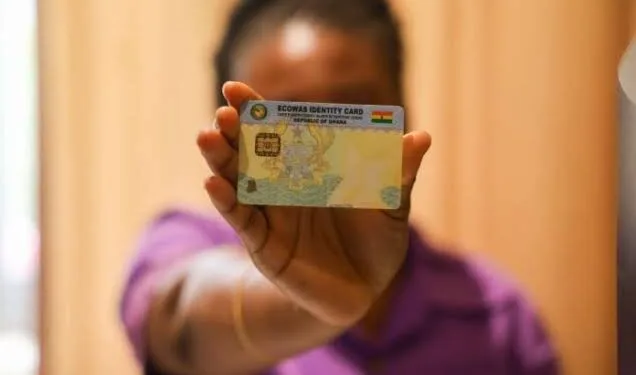
The new system eliminates that. Under the National Insurance Commission’s biometric verification framework, insurers and agents no longer capture photos, take photocopies, or scan the physical Ghana Card. That practice now violates L.I. 2523, the data protection instrument that governs how personal identification data may be processed.
📢 GET A DETAILED ARTICLES + JOBS
Join ASJ's WhatsApp Channel and never miss a post or opportunity.

Instead, verification happens digitally, in real time, through the NIA’s API. The system confirms that the person in front of the agent is the same person named on the card—and it does so without storing any raw biometric data.
For Individual Policyholders: Your Step-by-Step Role
If you are a Ghanaian or resident buying or renewing insurance, you now play an active role in your own verification. The process requires your participation, and it cannot be completed without you.

Step 1: Provide your core identifiers. You will present your Ghana Card Personal Identification Number (PIN)—the format is GHA-123456789-0—and the mobile phone number that is explicitly linked to your NIA profile. This matters. If the number on your NIA record does not match the number you give the insurer, the verification will fail.
Step 2: Await the secure link. The insurer’s platform will send an automated SMS to the number you provided. That SMS contains a unique authentication link. Do not ignore it. Do not delete it.
Step 3: Complete mobile authentication. Click the link. It opens the automated verification portal. Follow the on-screen prompts to consent to identity validation. This is your authorisation for the insurer to confirm your identity with the NIA.
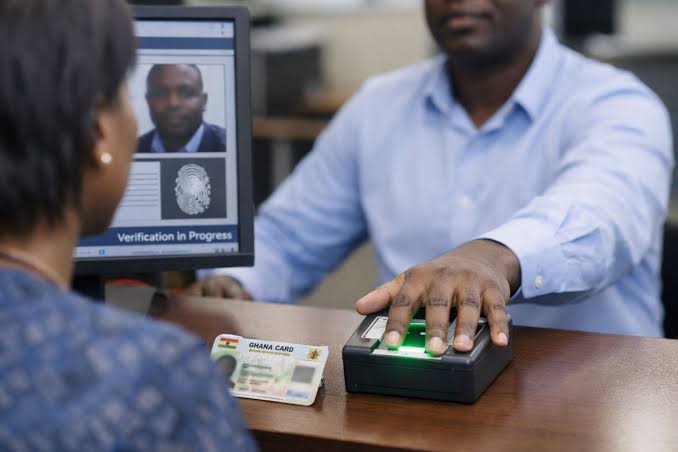
Step 4: Biometric verification if you are at a branch. If you are purchasing in person, you will place your finger on the approved biometric terminal or POS device provided by the agent. This is a “match-on-card” fingerprint scan—it compares your fingerprint to the one stored on your Ghana Card, in real time.
Step 5: Review and confirm. The system will display your autofilled data—legal name, date of birth, photo. Check that it matches your identity exactly before you authorise. If something is wrong, flag it before you proceed.
For Insurance Agents and Brokers: The New Rules of Onboarding
Agents and brokers are the frontline of this system. The rules are strict, and the penalties for non-compliance are real.
Step 1: Input the customer’s digital ID. Open your company’s official point-of-sale application or web portal. Enter the client’s Ghana Card PIN. Do not ask for a photocopy. Do not take a photo of the card with your phone.
Step 2: Collect corporate identifiers if applicable. If you are onboarding a corporate client, request their Tax Identification Number (TIN) alongside the designated representative’s Ghana Card PIN.
Step 3: Deploy the verification terminal. For face-to-face sales, prompt the customer to place their finger on your NIA-approved biometric terminal. For remote sales, trigger the automated SMS verification link through your portal.

Step 4: Await gateway approval. Wait for the real-time status to shift to “Verified” on your screen. Do not proceed until it does. And do not—under any circumstances—capture photos, take photocopies, or scan the physical Ghana Card. That violates L.I. 2523.
Step 5: Proceed to policy generation. Once the backend identity matches, you can fill in the specific vehicle or asset details to calculate the premium and close the sale.
For Insurance Underwriters: Assessing Risk with Verified Data
Underwriters no longer work with self-reported information. They work with data pulled directly from the NIA registry.
Step 1: Access the MID/NIA linked portal. Open your internal underwriting console. It is integrated with the Motor Insurance Database (MID) and the NIA API verification pipeline.
Step 2: Audit autofilled data. Review the risk profile using the verified identity dataset pulled from the NIA registry. Cross-reference the verified owner details against the Driver and Vehicle Licensing Authority (DVLA) registration records.
Step 3: Handle validation mismatches. If the system flags an identity mismatch—for example, the vehicle registration name does not match the verified Ghana Card holder—suspend policy generation immediately. Route the case to compliance for manual review.
Step 4: Commit risk to the ledger. Once verification checks clear, bind the risk profile to the verified digital identity. The system will automatically tag the unique Ghana Card PIN to the policy record.
For Insurance Companies: The Infrastructure Requirements
Insurers and their technology teams carry the heaviest responsibility. The system only works if the backend is built correctly.
Step 1: Integrate the unified verification API. Ensure your core insurance software is seamlessly integrated with the National Insurance Commission’s verification gateway and the central NIA infrastructure.
Step 2: Enforce hard system validation. Configure your policy issuance architecture so that the “Generate Policy/Cover Note” button remains locked and unclickable until a Verification_Success_Token is received from the NIA gateway. This is not optional. It is the control that prevents unverified policies from entering the system.
Step 3: Secure data erasure protocols. Audit all front-end applications—mobile apps, agent portals, web forms—to ensure they do not store, cache, or save images of physical cards or raw biometric strings. The data protection rules apply to your systems too.
Step 4: Sync real-time logs to the MID. Instantly upload the successfully verified policy details to the NIC’s Motor Insurance Database. This ensures immediate traffic compliance tracking for police and vehicle inspection units.
Executive Summary Table
| Stakeholder | Primary Action | Golden Rule |
|---|---|---|
| Ghanaians | Provide Card PIN + Phone Number + Approve Link/Biometrics | Ensure your phone number matches your NIA profile |
| Insurance Agents | Trigger SMS links or deploy biometric scan terminals | Never take physical photocopies or smartphone photos of the card |
| Underwriters | Cross-verify NIA data with DVLA asset registry | Flag and halt any policies showing a clear identity mismatch |
| Insurance Companies | Maintain live API infrastructure connected to NIC/NIA | Enforce system blocks that prevent policy creation without digital clearance |
Why This Matters
The old system was slow, insecure, and open to abuse. Fake insurance policies were a persistent problem. Fraudsters used stolen identities to buy cover, then disappeared when claims came due. Honest policyholders paid higher premiums to cover the losses.
The new system addresses that. It confirms identity in real time. It eliminates the storage of sensitive documents. It connects the NIA, the DVLA, the NIC, and insurers into a single verification chain.
For policyholders, it means your identity is protected. For agents, it means a cleaner, faster process—once you adapt. For underwriters, it means better data and fewer disputes. For insurers, it means a system that cannot be bypassed.
The transition will not be seamless. Some agents will resist the loss of familiar routines. Some policyholders will be confused by the SMS link. Some systems will fail to integrate smoothly. But the direction is clear, and the regulatory framework is in place.
Quick Facts
| Topic | Details |
|---|---|
| Regulator | National Insurance Commission (NIC) |
| Identity Authority | National Identification Authority (NIA) |
| Key Data Protection Instrument | L.I. 2523 |
| Verification Method | Ghana Card PIN + Mobile Number + SMS Link + Fingerprint |
| Agent Restriction | No photocopies, no photos, no physical card scans |
| System Control | Policy button locked until Verification_Success_Token received |
| MID Upload | Real-time policy details uploaded to Motor Insurance Database |
Frequently Asked Questions
1. What is the new Ghana Card biometric insurance verification system?
It is a digital verification framework that connects the National Identification Authority’s database directly to insurers’ platforms. It confirms identity in real time without requiring photocopies or physical card scans.
2. Do I still need to provide a photocopy of my Ghana Card for insurance?
No. Under the new framework, taking photocopies or photos of the Ghana Card violates L.I. 2523. Agents must verify your identity digitally using your Ghana Card PIN and mobile number.
3. What do I need to buy insurance under the new system?
You need your Ghana Card Personal Identification Number (PIN) and the mobile phone number linked to your NIA profile. The insurer will send a secure SMS link for you to authorise verification.
4. What happens if my phone number does not match my NIA profile?
Verification will fail. Ensure your current phone number is registered with the NIA before attempting to buy or renew insurance.
5. What is the “match-on-card” fingerprint scan?
It is a biometric verification method where your fingerprint is compared in real time to the one stored on your Ghana Card. It is used for in-person purchases at physical branches.
6. Can insurance agents take photos of my Ghana Card?
No. Capturing photos, photocopies, or scans of the physical Ghana Card is prohibited under L.I. 2523 and violates the new verification protocols.
7. How does the system prevent unverified policies?
Insurers must configure their systems so that the “Generate Policy” button remains locked until a Verification_Success_Token is received from the NIA gateway.
8. What happens if there is an identity mismatch during underwriting?
The system flags the mismatch and suspends policy generation. The case is routed to compliance for manual review.
9. How does the new system help prevent insurance fraud?
It eliminates fake policies, identity theft, and duplicate claims by confirming identity in real time against the NIA database and tagging every policy to a unique Ghana Card PIN.
10. What is the Motor Insurance Database’s role in this system?
Successfully verified policy details are uploaded to the MID in real time, ensuring immediate traffic compliance tracking for police and vehicle inspection units.
Source: Accra Street Journal
Last Updated on October 15, 2026 by Samuel Kwame Boadu
Disclaimer: Some content on Accra Street Journal may be aggregated, summarized, or edited from third-party sources for informational purposes. Images and media are used under fair use or royalty-free licenses. Accra Street Journal is a subsidiary of SamBoad Publishing Hub under SamBoad Business Group Ltd, registered in Ghana since 2014.
For concerns or inquiries, please visit our Privacy Policy or Contact Page.

Samuel Kwame Boadu is a Ghanaian media entrepreneur and storyteller with a passion for amplifying urban voices and uncovering everyday truths. He is the Editor-in-Chief and Founder of Accra Street Journal, a dynamic digital platform dedicated to capturing the pulse of Ghana’s capital—its people, culture, challenges, business, sports and innovations.