





Introduction: The Moment You Realise Your Mistake
You bought the credit. You received the token. You entered it carefully into your meter—and nothing happened. Or worse, you realise you typed the wrong meter number when purchasing.
Few things are more frustrating than paying for electricity credit that you cannot use. The good news is that tokens cannot be transferred from one meter to another. If you purchased credit for the wrong meter number, that token will only work on that specific meter .

So what can you do? You have two options: contact ECG customer service to request a refund, or use the ECG PowerApp’s refund feature if you made the purchase through the app.
📢 GET A DETAILED ARTICLES + JOBS
Join ASJ's WhatsApp Channel and never miss a post or opportunity.

This Accra Street Journal guide explains everything you need to know about reversing a wrong ECG token purchase—from understanding why tokens can’t be transferred to step-by-step instructions for getting your money back .
Why ECG Tokens Cannot Be Transferred
ECG prepaid tokens are generated using a secure encryption system called Standard Transfer Specifications (STS) . Each token is mathematically tied to a specific meter number .

This means:
-
A token purchased for meter number 12345678 will only work on that meter
-
You cannot “reassign” or “transfer” the token to a different meter
-
If you entered the wrong meter number during purchase, the token is effectively useless for your meter
The fix: You must purchase new credit with the correct meter number, then request a refund for the erroneous purchase .
Method 1: Request a Refund Through the ECG PowerApp (Fastest)
If you made your purchase through the ECG PowerApp, you can request a refund directly within the app. The ECG PowerApp allows you to “receive refunds faster should any transaction go wrong, and withdraw same refunds instantly to your mobile money wallet or bank account .
Step-by-Step Instructions
| Step | Action |
|---|---|
| 1 | Open the ECG PowerApp and log in to your account |
| 2 | Navigate to Transaction History |
| 3 | Locate the transaction for the wrong meter number |
| 4 | Select the transaction and click on “Request Refund” |
| 5 | Follow the prompts to withdraw funds to your mobile money wallet or bank account |
| 6 | Once refund is processed, purchase new credit with the correct meter number |
Note: This feature is designed specifically for failed transactions or cases where a transaction went wrong .
Method 2: Contact ECG Customer Service
If you purchased through a vendor, via USSD (*226#), or through any other method, you will need to contact ECG customer service directly to request a refund .
Information You Will Need
Before contacting ECG, gather the following details to speed up the process :
| Information Required | Where to Find It |
|---|---|
| Meter number (the one you intended to recharge) | Printed on your meter |
| Wrong meter number (the one you entered) | Your payment receipt |
| Mobile money number used for payment | Your phone |
| Amount purchased and date of transaction | Payment confirmation |
| MoMo transaction ID | Mobile money transaction history |
| ECG Transaction ID (if available) | ECG PowerApp or payment confirmation |
Contact Channels
| Method | Contact Information | Best For |
|---|---|---|
| Call Center | 0302 611 611 | Urgent issues, fastest response |
| +233 302 611 611 | Non-urgent inquiries | |
| [email protected] | Written record of request | |
| Social Media | @ECGghOfficial (Facebook, X, Instagram) | Public inquiries |
| In-person | Visit your nearest ECG district office | Complex cases |
What to Say When You Call
“Hello, I purchased prepaid credit for the wrong meter number. I need to request a refund so I can repurchase for the correct meter. Here is my meter number, the wrong meter number I entered, and my transaction details.”
Be prepared to provide: Your mobile money transaction ID, the amount purchased, and the date of the transaction .
Method 3: If the Token Was for Your Meter But Isn’t Working
Sometimes the problem isn’t that you entered the wrong meter number—it’s that your meter is rejecting a valid token due to a technical issue. This is not a wrong purchase situation, but it’s often mistaken for one.

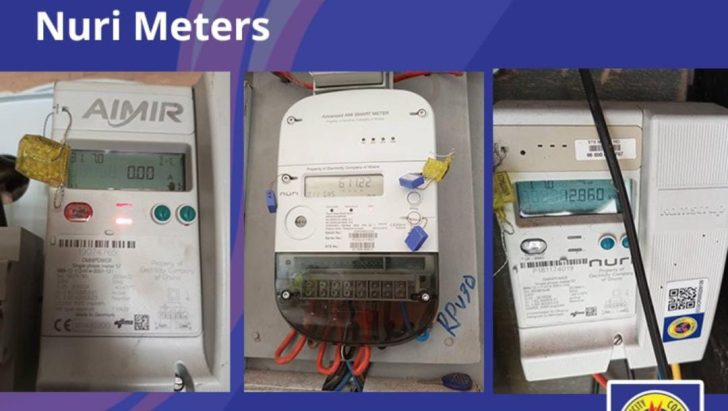
For NURI Meters: CRC Error
If you see the error message “The token CRC value is not equal to the CRC calculated with the data in the token,” your meter needs an STS protocol upgrade .
The fix (Relay Reset Method):
| Step | Action |
|---|---|
| 1 | Locate the “Display” knob or button on your NURI meter |
| 2 | Press and hold the button continuously |
| 3 | Wait until the word “Relay” appears on the screen |
| 4 | Release the button |
| 5 | Re-enter your token |
If that doesn’t work: Your meter needs a free STS upgrade. Contact ECG at 0302 611 611 to schedule one .
For NURI Meters: “Successful” but No Power
If the meter says “successful” but your lights remain off, try re-entering the same token a second time after waiting 30 seconds .
For Clou Meters: 40-Digit Token Required
If your Clou meter needs a 40-digit upgrade token, this is not a wrong purchase—it’s part of a scheduled system upgrade . Contact ECG at 0302 611 611 for the upgrade token .
Common Mistakes to Avoid
| Mistake | Why It’s a Problem | What to Do Instead |
|---|---|---|
| Attempting to “transfer” the token | Tokens are mathematically tied to specific meters and cannot be transferred | Request a refund and purchase new credit |
| Paying someone to “fix” the token | Scammers may promise to transfer your token for a fee—this is impossible | Only work with ECG directly |
| Waiting too long to request a refund | Delays may complicate the refund process | Contact ECG immediately after realising the error |
| Not keeping transaction details | ECG needs this information to process your refund | Always save payment confirmations |
| Repurchasing without requesting a refund first | You may end up paying twice | Request refund, then repurchase |
How to Prevent Wrong Meter Number Purchases in the Future
| Prevention Tip | How to Do It |
|---|---|
| Save your meter number in your phone | Add it as a contact or note for easy reference |
| Double-check before confirming payment | Always verify the meter number on your purchase screen |
| Link your meter to the ECG PowerApp | Once linked, the app saves your meter number so you don’t have to re-enter it |
| *Use the ECG PowerApp or USSD 226# | These official channels save your meter after first use |
| Keep a recent receipt with your meter number | Tape it inside a kitchen cabinet for easy access |
Summary Table: Wrong Token Purchase Scenarios and Solutions
| Scenario | What Happened | Solution |
|---|---|---|
| Wrong meter number entered | You purchased credit for a different meter | Request refund from ECG (Method 1 or 2); repurchase with correct meter number |
| CRC error on NURI meter | Meter needs STS upgrade, not a wrong purchase | Use Relay Reset method; if fails, contact ECG for free upgrade |
| “Successful” but no power | Meter relay not resetting | Re-enter token; try Relay Reset method |
| Clou meter needs 40-digit token | Meter upgrade in progress | Contact ECG for upgrade token |
| Lost token after purchase | You deleted the SMS or closed the app | Check SMS history; use PowerApp transaction history; call ECG |
Important Security Note: Beware of Scams
ECG does not have any private mobile money accounts. All legitimate payments must go through the ECG PowerApp or the official short code *226# .
Warning Signs of Scams:
| Warning Sign | What to Do |
|---|---|
| Someone calls demanding payment to “transfer” your token | Hang up – token transfer is impossible |
| Caller claims to be from ECG but asks for cash | Hang up – ECG does not accept cash for this |
| Caller offers “debt cancellation” for a fee | Ignore – this is a scam |
| Caller asks for your mobile money PIN | Never share – ECG will never ask for your PIN |
If you receive such a call: Hang up immediately. Report the number to ECG customer service at 0302-611611 .
Frequently Asked Questions (FAQs)
1. Can I transfer an ECG token from one meter to another?
No. ECG prepaid tokens are mathematically tied to specific meter numbers and cannot be transferred. If you purchased for the wrong meter, you must request a refund and purchase new credit .
2. How do I get a refund for a wrong ECG token purchase?
Contact ECG customer service at 0302 611 611 with your transaction details, or use the refund feature in the ECG PowerApp if you purchased through the app .
3. How long does it take to get an ECG refund?
Refunds through the ECG PowerApp can be processed instantly to your mobile money wallet or bank account . Refunds requested through customer service may take longer depending on the issue.
4. What information does ECG need to process a refund?
You will need your meter number, the wrong meter number you entered, the amount purchased, the date of the transaction, and the mobile money transaction ID .
5. I entered the wrong meter number but the token was already used by someone else. Can I still get a refund?
If the token was successfully used on another meter, you may not be eligible for a refund. Contact ECG customer service to discuss your situation .
6. Can I get a refund if I lost my token?
Yes, if you have proof of purchase. Contact ECG with your transaction details, and they can retrieve the token or process a refund .
7. Is there a fee for ECG refunds?
No, ECG does not charge fees for legitimate refund requests. Do not pay anyone who offers to process a refund for a fee .
8. How do I contact ECG for a refund?
Call 0302 611 611, WhatsApp +233 302 611 611, email [email protected], or visit your nearest ECG district office .
9. What if the ECG PowerApp is not working?
Try using the USSD code *226# or visit a physical ECG prepayment vendor. You can also call ECG customer service directly .
10. How can I prevent buying credit for the wrong meter in the future?
Save your meter number in your phone, double-check before confirming payment, and link your meter to the ECG PowerApp for faster, error-free purchases .
Conclusion: Act Quickly, Use Official Channels
A wrong ECG token purchase is frustrating, but it is fixable. The key is to act quickly and use only official channels .
Remember these key points:
-
Tokens cannot be transferred to different meters
-
Your best options are requesting a refund through the ECG PowerApp (if purchased there) or calling ECG customer service at 0302 611 611
-
Keep your transaction details handy when requesting a refund
-
Never pay anyone who offers to “transfer” your token or “fix” your purchase for a fee
-
For future purchases, double-check your meter number before confirming payment
The lights will come back on. You just need to go through the proper channels.
Frequently Asked Questions (FAQs)
1. Can I transfer an ECG token from one meter to another?
No. Tokens are mathematically tied to specific meter numbers and cannot be transferred .
2. How do I get a refund for a wrong ECG token purchase?
Contact ECG customer service at 0302 611 611 with your transaction details, or use the refund feature in the ECG PowerApp .
3. How long does it take to get an ECG refund?
PowerApp refunds can be instant. Customer service refunds may take longer .
4. What information does ECG need for a refund?
Your meter number, the wrong meter number, amount purchased, transaction date, and MoMo transaction ID .
5. I entered the wrong meter number but the token was used. Can I still get a refund?
Possibly not. Contact ECG customer service to discuss your situation .
6. Can I get a refund if I lost my token?
Yes, if you have proof of purchase. Contact ECG with your transaction details .
7. Is there a fee for ECG refunds?
No. Do not pay anyone offering to process a refund for a fee .
8. How do I contact ECG for a refund?
Call 0302 611 611, WhatsApp +233 302 611 611, or email [email protected] .
9. What if the ECG PowerApp is not working?
Use USSD *226# or visit a physical ECG prepayment vendor .
10. How can I prevent buying credit for the wrong meter?
Save your meter number, double-check before payment, and link your meter to the ECG PowerApp .
Last Updated on April 14, 2026 by Samuel Kwame Boadu
Disclaimer: Some content on Accra Street Journal may be aggregated, summarized, or edited from third-party sources for informational purposes. Images and media are used under fair use or royalty-free licenses. Accra Street Journal is a subsidiary of SamBoad Publishing Hub under SamBoad Business Group Ltd, registered in Ghana since 2014.
For concerns or inquiries, please visit our Privacy Policy or Contact Page.

Samuel Kwame Boadu is a Ghanaian media entrepreneur and storyteller with a passion for amplifying urban voices and uncovering everyday truths. He is the Editor-in-Chief and Founder of Accra Street Journal, a dynamic digital platform dedicated to capturing the pulse of Ghana’s capital—its people, culture, challenges, business, sports and innovations.