






Introduction: The Frustration of Not Knowing
You wake up in the middle of the night, and the fan has stopped. You check your phone—no Wi-Fi. You stumble to the meter, squint at the tiny screen, and press buttons hoping to find your remaining credit. Sound familiar?
Knowing your prepaid meter balance shouldn’t be a guessing game. Whether you have an older keypad meter, a new smart meter, or a postpaid connection, the Electricity Company of Ghana (ECG) has made it easier than ever to check your balance from the comfort of your phone. This Accra Street Journal guide covers all methods for all meter types.

The Three Ways to Check Your ECG Meter Balance
ECG provides three primary methods to check your prepaid meter balance, regardless of your meter type :
📢 GET A DETAILED ARTICLES + JOBS
Join ASJ's WhatsApp Channel and never miss a post or opportunity.

| Method | Best For | Requires |
|---|---|---|
| ECG PowerApp | Smartphone users, frequent checkers | Smartphone, internet connection |
| *USSD Code 226# | All phone types, quick checks | Any mobile phone (basic or smartphone) |
| Smart Meter Interface | On-the-spot checks | Physical access to meter |
Method 1: ECG PowerApp (Recommended for Smartphone Users)
The ECG PowerApp is the company’s official mobile application, redesigned to provide a seamless experience for checking balances, purchasing credit, and reporting faults .
Download and Setup
| Step | Action |
|---|---|
| 1 | Download the ECG PowerApp from Google Play Store (Android) or Apple App Store (iOS) |
| 2 | Open the app and sign up with your details |
| 3 | Enter your meter number to link your account |
| 4 | Verify your information to complete setup |
App Requirements:

-
Android: Version 7.0 or later
-
iOS: Version 13.0 or later; also compatible with iPadOS 13.0+, macOS 11.0+ (Apple M1 chip or later), and visionOS 1.0+
-
App Size: Approximately 109.2 MB
How to Check Your Balance
Once your meter is linked, follow these steps :
-
Open the ECG PowerApp
-
Navigate to the Meter section
-
Select your linked meter
-
Click on “See Details”
-
Your remaining balance, consumption history, and other information will be displayed
What Else the App Can Do
Beyond checking your balance, the ECG PowerApp allows you to :
-
Purchase prepaid credit for all meter types (and soon for selected card-based meters via NFC and Bluetooth)
-
View daily consumption to track your usage patterns
-
Report faults directly through the app
-
Access refunds faster if transactions go wrong—withdraw instantly to your mobile money wallet or bank account
-
Pay postpaid bills and view statements
-
Receive real-time notifications about outages and maintenance
Good to Know: Mobile money transactions through the ECG PowerApp do NOT attract E-Levy or transaction fees .
User Feedback
A recent user review noted: “I would love to easily check my balance also. But in all it’s very good” . While the app has received positive feedback for its top-up features, some users have reported that the balance display feature needs improvement .
Method 2: USSD Code *226# (Works on Any Phone)
For customers without smartphones or those who prefer a quicker method, ECG’s USSD shortcode provides an efficient alternative. After resolving a technical challenge in June 2025, the *226# service is now fully functional .
How to Use *226#
| Step | Action |
|---|---|
| 1 | Dial *226# on any mobile phone |
| 2 | Follow the on-screen prompts to select your desired service |
| 3 | Choose “Check Balance” from the menu options |
| 4 | Enter your meter number when prompted |
| 5 | Your remaining balance will be displayed on your phone screen |
Services Available via *226#
The USSD shortcode allows customers to :
-
Check outstanding balance
-
Purchase prepaid credit for smart prepaid meters
-
Pay bills without internet access
-
View transaction history
Important Note on Meter Types
The USSD code works seamlessly with smart prepaid meters that are compliant with ECG’s new Meter Management System (MMS) . If you have an older meter, you may need to use the PowerApp or the meter interface instead.
Mobile Money Savings: Like the PowerApp, transactions via *226# do not attract mobile money charges or E-Levy fees .
Method 3: Smart Meter Interface (On the Meter Itself)
For customers with smart prepaid meters, you can check your balance directly on the meter’s display unit without any phone or internet connection .

Understanding Your Smart Meter
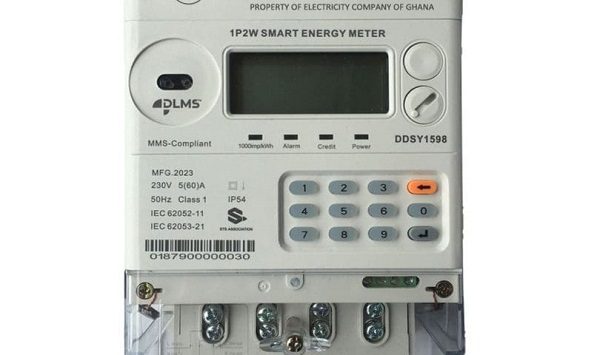
Smart prepaid meters installed by ECG are compliant with the new Meter Management System (MMS), integrating all smart meters onto a common platform . These meters offer several convenient features.
How to Check Balance on a Smart Meter
| Action | What Happens |
|---|---|
| Press the blue button on the meter interface | The display cycles through different information screens |
| Look for the “Remaining Credit” display | Shows your current balance in Ghana cedis |
| Some meters show credit in kWh units | Multiply by your tariff rate to convert to cedis |
Information Available on Smart Meters
According to ECG’s Volta Regional Communications Officer, customers with smart prepaid meters can access :
-
Remaining credit (in cedis or kWh)
-
Current credit balance
-
Date of last purchase
-
Amount of last purchase
-
Total credit purchased
What If You Have an Older Meter?
If you still have a non-smart prepaid meter, ECG is in the process of replacing these with new smart MMS-compliant meters at no cost to customers . The replacement exercise is free, and all outstanding credit balances on old meters are transferred to the new smart meter .
If you have an older meter and cannot check your balance using the methods above, contact your nearest ECG office or call the call center at 0302 611 611 for assistance .
Method 4: For Postpaid Customers (Monthly Bill Users)
While this guide focuses on prepaid meters, postpaid customers can also check their outstanding balance using similar methods.
How Postpaid Customers Can Check Balance
| Method | How to Use |
|---|---|
| ECG PowerApp | Download the app, sign up, and add your meter number. Navigate to “See Details” and select the month to view your opening balance and monthly bill |
| *USSD 226# | Dial the code and follow prompts to check your outstanding balance |
| Physical bill | Monthly paper bills delivered to your address show your balance and payment due date |
Viewing and Printing Bills via the App
To view and print your bill through the ECG PowerApp :
-
Open the app and go to the Meter column
-
Click on “See Details”
-
Select the month
-
Under “Your Opening Balance,” click “See Your Monthly Bill”
-
Click “View Bill”
-
Select the month and year, then download and print your bill
Troubleshooting Common Issues
Issue 1: App Shows Balance as GHS 0.00
Some users have reported that the ECG PowerApp sometimes displays a balance of 0.00 even when there is credit on the meter . This appears to be a technical issue that ECG is working to resolve.
What to do:
-
Check your balance using the USSD code *226# as a backup
-
Or check directly on your smart meter interface
-
Report the issue through the app’s feedback feature
Issue 2: USSD Code Not Working
If *226# does not work:
-
Ensure you have sufficient mobile network coverage
-
Check that you have airtime on your phone (though the service itself is free)
-
Try the ECG PowerApp instead
-
Contact ECG Call Center at 0302 611 611
Issue 3: Smart Meter Screen Not Responding
If your smart meter interface is unresponsive:
-
Check if the meter has power (the display should be lit)
-
Press and hold the blue button for 3-5 seconds
-
If still not working, report to ECG for maintenance
Issue 4: Can’t Link Meter to App
If you are unable to add your meter to the ECG PowerApp:
-
Verify that you have the correct meter number
-
Ensure the meter number is entered exactly as it appears on your meter
-
Contact ECG Call Center for assistance
Comparison of Methods at a Glance
| Feature | ECG PowerApp | USSD *226# | Smart Meter | Postpaid |
|---|---|---|---|---|
| Requires smartphone | Yes | No | No | Optional |
| Requires internet | Yes | No | No | Optional |
| Check remaining credit | Yes | Yes | Yes | N/A |
| Check outstanding bill | Yes | Yes | No | Yes |
| Purchase credit | Yes | Yes | No | N/A |
| View consumption history | Yes | Limited | Yes | Yes |
| Report faults | Yes | No | No | No |
| Mobile money fees/E-Levy | None | None | N/A | N/A |
Summary: Which Method Should You Use?
| If You… | Use This Method |
|---|---|
| Have a smartphone and want full account management | ECG PowerApp (download from Play Store or App Store) |
| Have any phone and want a quick balance check | *USSD 226# |
| Are standing at your meter and have no phone | Smart meter interface (press blue button) |
| Want to avoid app or USSD entirely | Visit nearest ECG office |
Frequently Asked Questions (FAQs)
1. How do I check my ECG prepaid meter balance using my phone?
You have two options: download the ECG PowerApp from Google Play Store or Apple App Store, or dial *226# on any mobile phone .
2. Does checking my ECG balance cost money?
No. Both the ECG PowerApp and the USSD code *226# are free to use. Mobile money transactions through these platforms also do not attract E-Levy or transaction fees .
3. Why does the ECG PowerApp show my balance as 0.00 even when I have credit?
This is a known technical issue that some users have reported. Check your balance using the USSD code *226# or your smart meter interface as a backup .
4. Can I check my ECG balance without the app or internet?
Yes. Dial *226# from any mobile phone (basic or smartphone) to check your balance without internet access .
5. How do I check my smart prepaid meter balance on the meter itself?
Press the blue button on your smart meter’s Customer Interface Unit. The display will cycle through information, including your remaining credit .
6. Does ECG charge for the PowerApp?
No. The ECG PowerApp is completely free to download and use .
7. Can I check my daily consumption on the ECG PowerApp?
Yes. According to ECG officials, the app allows customers to check their daily consumption patterns .
8. What if I have an old meter that doesn’t work with these methods?
ECG is in the process of replacing all non-smart prepaid meters with new smart MMS-compliant meters at no cost to customers. Contact your nearest ECG office for a free replacement .
9. How do I contact ECG if I’m having trouble checking my balance?
Call the ECG Call Center at 0302 611 611 or visit your nearest ECG district office .
10. Are mobile money payments on ECG platforms subject to E-Levy?
No. ECG’s cashless system ensures that customers do not pay E-Levy or mobile money transaction fees when using the PowerApp or USSD code *226# .
Conclusion Frm ASJ
Knowing your ECG prepaid meter balance is essential for managing your electricity consumption and avoiding unexpected power outages. Whether you prefer the convenience of the ECG PowerApp, the simplicity of the USSD code *226#, or the direct read from your smart meter, there is a method that works for your device and situation.
For most users, the ECG PowerApp provides the most comprehensive experience, allowing you to check your balance, purchase credit, view consumption patterns, and report faults—all from your smartphone . If you have a basic phone or no internet access, the *USSD code 226# is your best option . And for those who prefer to check directly at the source, your smart meter interface provides instant access to your remaining credit .
If you are still using an older meter that doesn’t support these features, contact ECG for a free replacement with a new smart MMS-compliant meter . The upgrade is free, and your existing credit will be transferred to your new meter.
Source: Accra Street Journal
Last Updated on April 12, 2026 by Samuel Kwame Boadu
Disclaimer: Some content on Accra Street Journal may be aggregated, summarized, or edited from third-party sources for informational purposes. Images and media are used under fair use or royalty-free licenses. Accra Street Journal is a subsidiary of SamBoad Publishing Hub under SamBoad Business Group Ltd, registered in Ghana since 2014.
For concerns or inquiries, please visit our Privacy Policy or Contact Page.

Samuel Kwame Boadu is a Ghanaian media entrepreneur and storyteller with a passion for amplifying urban voices and uncovering everyday truths. He is the Editor-in-Chief and Founder of Accra Street Journal, a dynamic digital platform dedicated to capturing the pulse of Ghana’s capital—its people, culture, challenges, business, sports and innovations.