










One of the biggest mistakes mobile money users make in Ghana is assuming:

“I can send or receive any amount anytime.”
That assumption usually gets tested the hard way — when a transaction fails.
📢 GET A DETAILED ARTICLES + JOBS
Join ASJ's WhatsApp Channel and never miss a post or opportunity.
For users on AT Ghana, your AT Money wallet has limits.
Not because the system is restrictive — but because it is regulated.
And understanding these limits is what separates smooth transactions from frustrating interruptions.
First: Why wallet limits exist
Mobile money is now part of Ghana’s financial system.
That means it must follow rules designed to:
- Prevent fraud
- Control large, suspicious transactions
- Protect users
- Align with national ID verification
Your wallet is tied to your identity through the National Identification Authority.
So limits depend on how verified your account is.
The three main types of limits
Every AT Money user should understand these:
1. Daily transaction limit
This is the maximum amount you can:
- Send
- Receive
- Transfer
Within one day
If you exceed it, transactions will fail — even if you have money.
2. Wallet balance limit
This is the maximum amount your wallet can hold at any time.
If your wallet reaches this limit:
- You cannot receive more money
- Until you withdraw or spend some
3. Monthly transaction limit
This is the total amount you can transact within a month.
Once you hit this cap:
- Further transactions may be restricted
- Until the next cycle
Typical AT Money limit structure (general guidance)
While exact figures can change, the structure usually follows:
Basic / Minimum KYC accounts
(Partially verified users)
- Lower daily limits
- Lower wallet balance caps
- Restricted transactions
These accounts are not meant for heavy usage.
Fully verified accounts
(Linked properly to Ghana Card)
- Higher daily limits
- Higher wallet balance
- Full access to services
This is where most serious users should be.
The mistake most users make
They hit a limit — and assume:
- The network is down
- The system is faulty
- Their account is blocked
But the issue is often simple:
They reached their transaction cap.
How to increase your AT Money limits
If your limits are too low, the solution is not guesswork.
It is verification.
Step 1: Ensure full registration
Your SIM and wallet must be properly registered with your Ghana Card.
Step 2: Visit a service center
Go to an official office of AT Ghana.
Request:
“I want to upgrade my AT Money account to increase my limits.”
Step 3: Complete verification
They may:
- Confirm your identity
- Update your details
- Upgrade your account level
Result: Higher limits
Once verified, your wallet gains:
- More transaction capacity
- Fewer restrictions
- Better usability for business or personal use
How to check your current limits
Dial:
*110#
Then:
- Navigate to account or settings
- Look for limit or account info (if available)
If not clearly shown, ask at a service center.
When limits become a real problem
Limits affect you most when:
- Running a small business
- Receiving large payments
- Sending bulk transactions
- Managing frequent transfers
In these cases, a basic account will not be enough.
Comparing with other networks
Other providers like MTN Ghana and Telecel Ghana also use similar tiered limit systems.
So this is not unique to AT Ghana.
It is industry standard.
The deeper reality
Mobile money in Ghana is no longer just telecom convenience.
It is:
- A regulated financial service
- Identity-linked
- Transaction-monitored
So limits are not barriers.
They are controls.
Key takeaways
- There are three AirtelTigo money account levels—Platinum, Gold, and Bronze—which determine your transaction and balance limits.
- Dial *110# and follow the prompts to check your wallet limit.
- To upgrade your account limits, visit any AirtelTigo office with your ECOWAS card and a recent 6-month bank statement.
Like all financial services, AirtelTigo Money has limits on how much you can hold, send, or receive in your mobile money wallet. In this article, we’ll show you how to check and increase your AT Money limit.
AirtelTigo money limits
AirtelTigo Money accounts come in three levels: Platinum, Gold, and Bronze.
- Platinum or Enhanced: Ideal for users who engage in large or unlimited transactions or transfers.
- Gold or Medium: Users with a Gold account have moderate transaction and balance limits.
- Bronze or Minimum: This is a basic account with the lowest transaction and balance limits.
Here’s a complete overview of the account limits at each level:
| Account level | Wallet capacity (GH₵) | Daily limit (GH₵) | Monthly limit (GH₵) |
| Platinum (Enhanced) | 50,000 | 15,000 | No limit |
| Gold (Medium) | 25,000 | 10,000 | No limit |
| Bronze (Minimum) | 3,000 | 2,000 | 6,000 |
Your account level depends on your KYC (Know Your Customer) verification.
FYI: KYC verification is a process used to verify customers’ identities, ensuring they are who they claim to be.
How to check your AirtelTigo money limit?
If you’re unsure about your current ATM account limit, here’s how to check it to avoid transaction issues:
- Dial *110#.
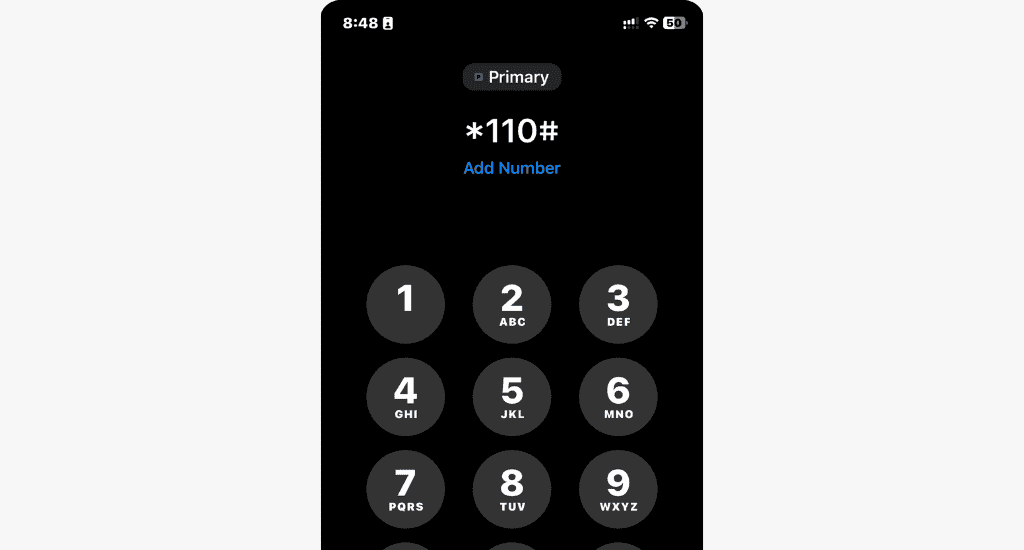
- Select My Account.
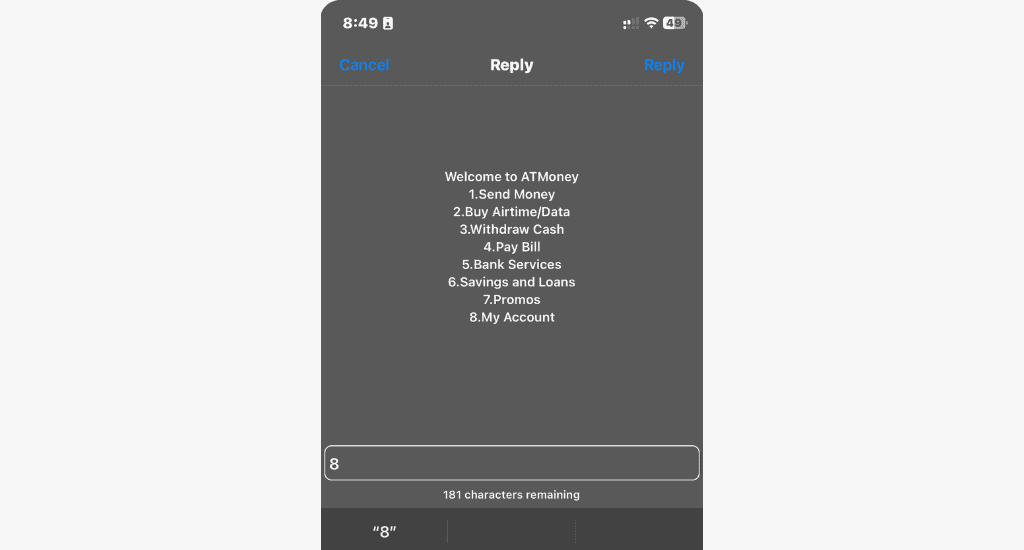
- Select ATM Limit Check.
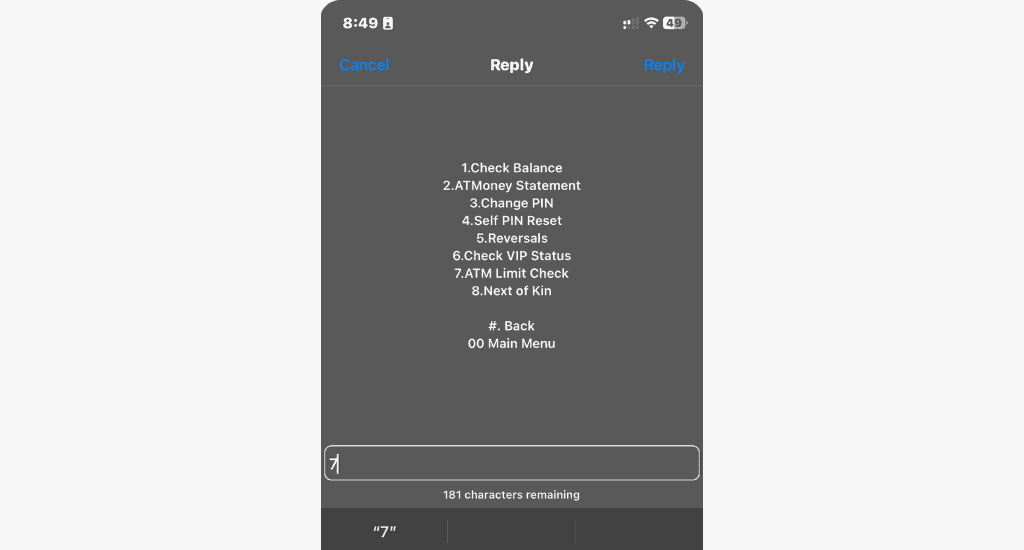
- Enter your AirtelTigo Money PIN.
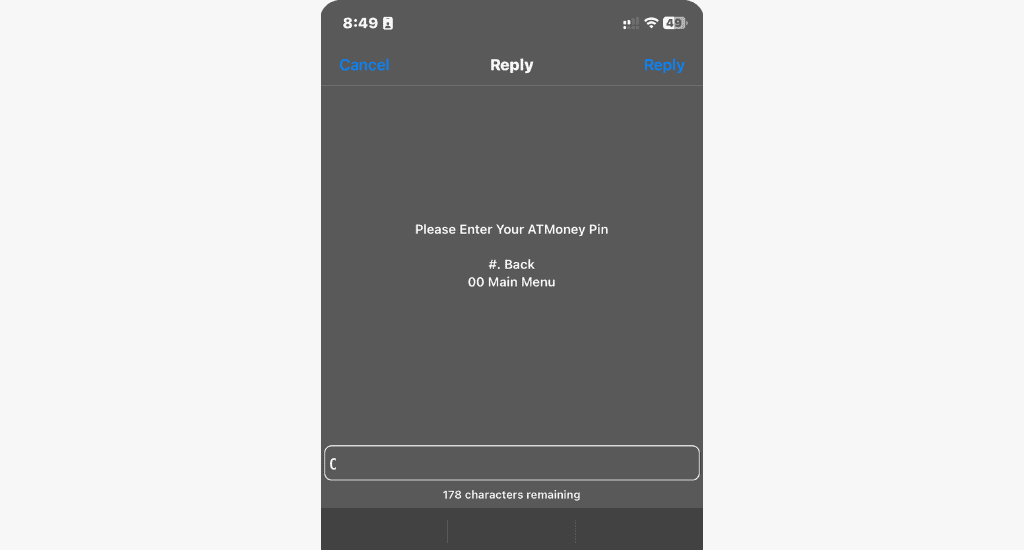
- Select Check Wallet Limit.
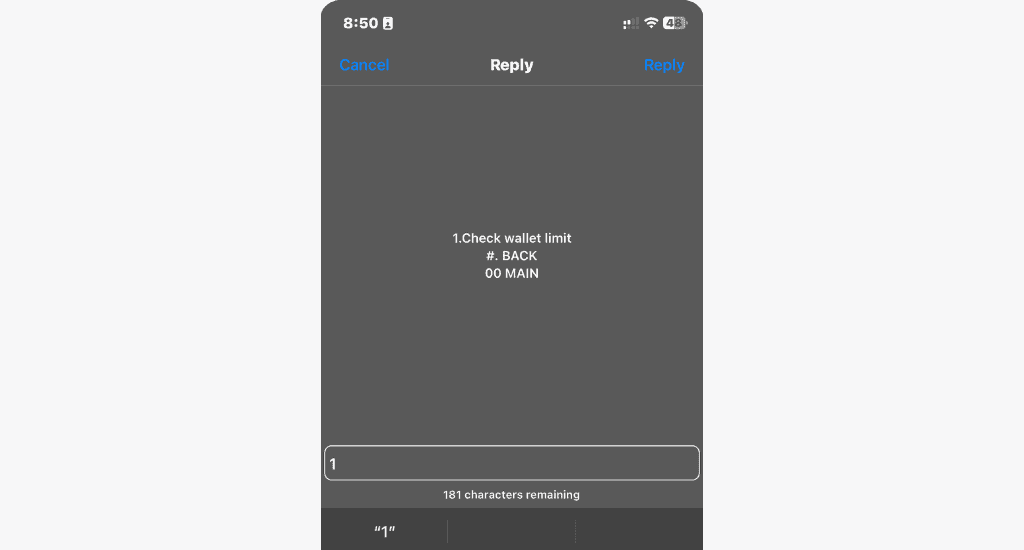
A message will pop up displaying your maximum balance and daily and monthly limits.
Note: The ATM wallet limit check is currently undergoing modifications. So, if you receive a message that says, “Dear Customer, to upgrade your ATMoney account, …” reach out to AirtelTigo’s support for assistance.
How to increase your AirtelTigo money limit?
To increase your current AirtelTigo Money limit, contact their customer service. They’ll take your number and provide you with further instructions.
Typically, you’ll need to visit an AirtelTigo office close to you with your ECOWAS card (Ghana card) and some supporting documents, which may include:
- A recent 6-month bank account statement.
- A registered tenancy agreement.
- Utility bills in your name.
- An income tax certificate.
- A reference letter or an employer’s reference letter.
Please note that the specific documents required vary depending on your current account level.
Managing your AirtelTigo Money limits gives you better control over your financial transactions.
Knowing how to check and increase your limits helps you make the most of your ATM account. If you have any questions or feedback, don’t hesitate to share them with us.
ASJ Final word
If your AT Money transactions keep failing, don’t assume the worst.
Check your limits.
Understand your account level.
Upgrade if necessary.
Because in today’s Ghana, mobile money is powerful — but only if your account is set up to match how you use it.
FAQs
What is the AT Money daily limit?
It depends on your account verification level.
Why can’t I send money even though I have balance?
You may have reached your daily or monthly transaction limit.
How do I increase my wallet limit?
Upgrade your account by completing full verification at a service center.
Can my wallet hold unlimited money?
No, there is a maximum balance limit.
How do I check my limits?
Dial *110# or visit a service center for detailed information.
Source: Accra Street Journal
Last Updated on May 2, 2026 by Samuel Kwame Boadu
Disclaimer: Some content on Accra Street Journal may be aggregated, summarized, or edited from third-party sources for informational purposes. Images and media are used under fair use or royalty-free licenses. Accra Street Journal is a subsidiary of SamBoad Publishing Hub under SamBoad Business Group Ltd, registered in Ghana since 2014.
For concerns or inquiries, please visit our Privacy Policy or Contact Page.

Samuel Kwame Boadu is a Ghanaian media entrepreneur and storyteller with a passion for amplifying urban voices and uncovering everyday truths. He is the Editor-in-Chief and Founder of Accra Street Journal, a dynamic digital platform dedicated to capturing the pulse of Ghana’s capital—its people, culture, challenges, business, sports and innovations.